
The 4-Step Sketching Process is a visual thinking technique used in Google Design Sprints to help teams brainstorm and develop well thought-out concepts individually (yet together). With clearly defined roles, the team takes predetermined steps with timed execution.
Here’s a breakdown of the steps in this process:
Notetaking
Each individual in the team will take 20 minutes to review all of the previously completed sprint materials. This should include the How Might We Questions, Long-Term Goals, Sprint-focused Questions, the User Map, and the Lightning Demos. The last piece to this puzzle is the 4 step sketch, which is what is being done now.
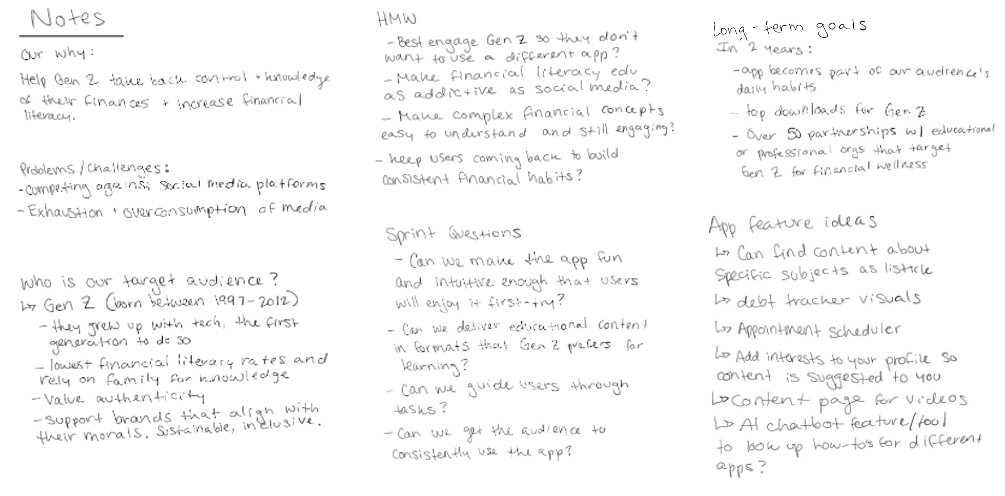
Ideas
A lot of inspiration for me came from my Lightning Demos, which are “existing solutions, products, or services that inspire [the sprinters] are are relevant to the Sprint’s Challenge.” In this case, I chose apps that have User Interface designs that could be applicable to another type of application, and the fact that I just really enjoy using them as a consumer.
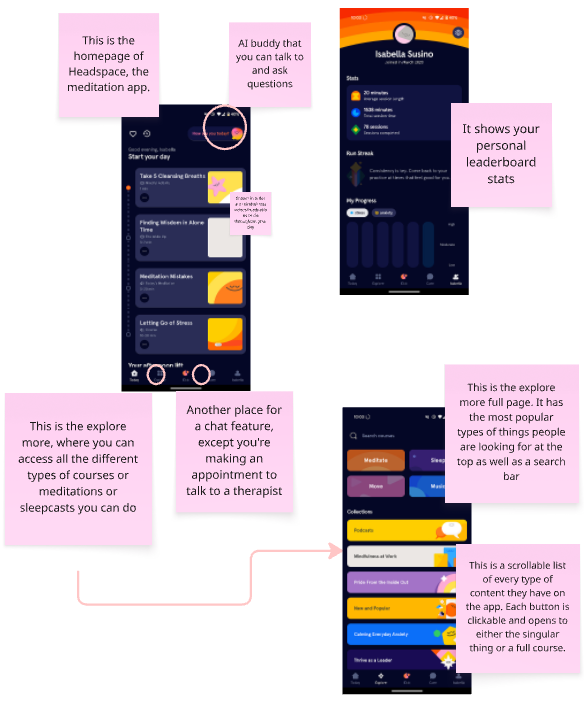
For the first Lightning Demo, I chose Headspace, a meditation app. The sticky notes are points of interest that I wanted to draw attention to and notes about why I liked certain features.
The first thing I decided I wanted to implement was the daily chicklisted content that’s on the homepage. It gives users a clear indication to follow these readings, meditations, videos, etc and what time throughout the day to complete them. Once one is done, the circle becomes filled-in next to the item.
The second thing I really like is their content page, where you can search or scroll through all of the different categories and content types they have. For our app idea, I’d find it helpful to have recommended pieces of content based on previous content consumed, rather than what’s most popular or searched for app-wide.
The third thing is the therapy section, except to apply it in a financial way we’d have to connect users with a financial advisor. This is where the paid partnerships would come in!
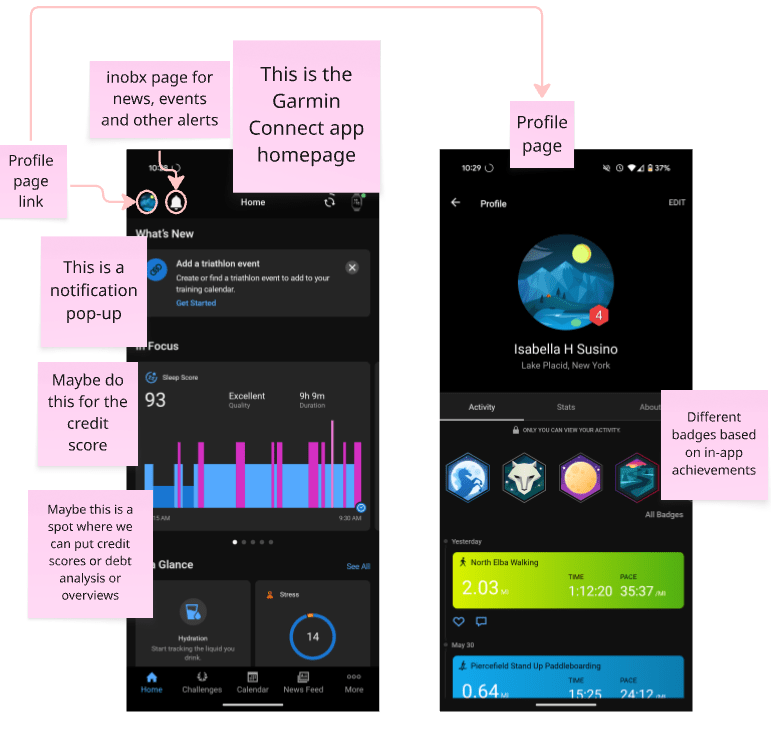
The second app I wanted to focus on was the Garmin Connect app, where the users of the Garmin GPS watches upload the data from the watch. As a Design Sprint group, my team mentioned they like the gamification of our app idea, and I thought the different in-app badges served the right purpose.
What is a Garmin badge? How do you earn them?
Badges are awarded for completing specific goals and can be earned using a Garmin® or Tacx® device.
Each badge earns a set amount of points towards your total in order to compete against your connections in the Garmin Connect™ online community.
Point levels range from level 1 up to level 10. Available badges change regularly with some only available for a limited time.
So, by applying this system to our app idea, we gamify and have our users compete against themselves in order to earn badges based on their app usage.
Crazy 8’s
This step forces the Design Sprint participants to get their ideas down on paper fast, only relying on their intuition. Folding a sheet into 8 sections and then using one minute per square to draw your ideas from your idea section. Focusing on one idea at a time, and moving through 8 different iterations of it. If you get stuck, that’s the only time that you would move onto another idea.
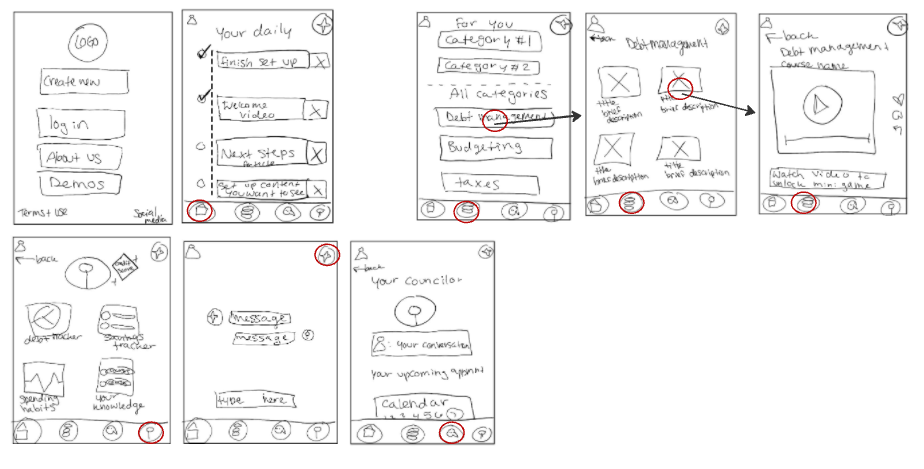
Because I was out of state training for a observation-based research postion in Indiana, I had to use my tablet to do this step.
Solution Sketch
Now we put it all together and draw the final iteration, maybe going back to a couple of different ideas for the app and combining and refining them.
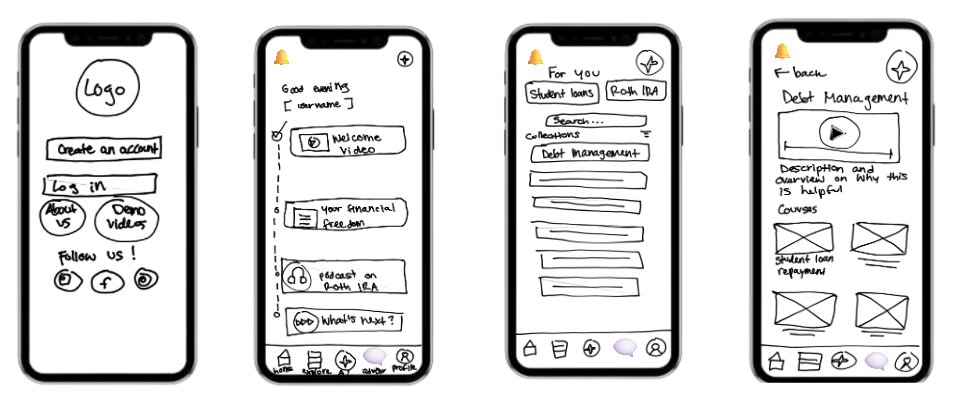
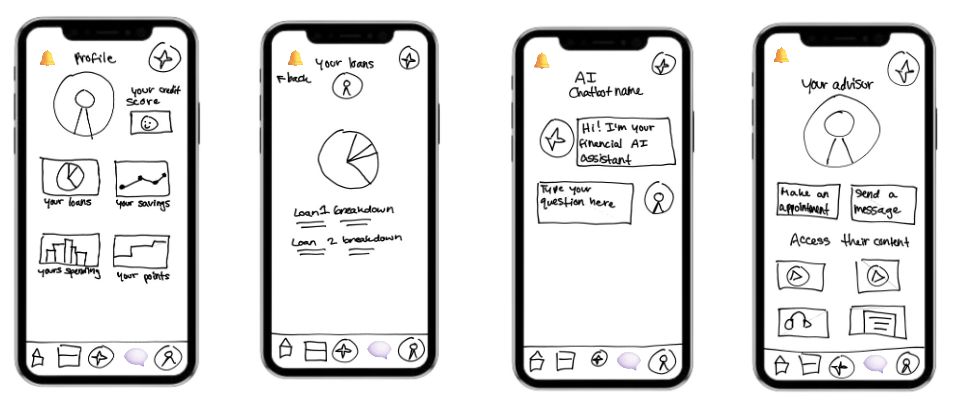
The Solution Sketch really pulls everything into focus. It’s where scattered ideas from Lightning Demos, Notetaking, Ideation and the Crazy 8’s get funneled into one concept. I found it super helpful to revisit earlier sketches and merge elements that I liked the best.
Some final thoughts
The 4 Step Sketching Process doesn’t pressure you to be an artist—it pushes you to be intentional and to listen to your gut feelings. From drawing inspiration to ideating quickly, the process keeps you moving forward without overthinking. And honestly, combining this method with Lightning Demos made the experience not only structured, but actually doable.
It’s wild how a few pieces of paper (or a tablet, in my case) can turn simple likable app features into a potentially tangible product.
 Isabella Susino
Leave a comment